



Quick answer: Angular server-side rendering (SSR) renders your app on the server, sending fully formed HTML to the browser so first paint is instant and search engines see complete content. The modern setup is ng add @angular/ssr, which installs the server bundle and hydration support. The server renders the first navigation, the browser takes over with hydration, and the app becomes interactive without a visible re-load.

Table of Contents

What SSR changes about a client-rendered app
A purely client-rendered app ships a small HTML shell and a large JavaScript bundle; nothing visible appears until that bundle downloads, parses and executes. Server-side rendering moves the first render to the server. The browser receives HTML with the actual page in it: headings, text, images with sources, metadata. First contentful paint happens on the first byte stream, and the JavaScript bundle becomes an upgrade rather than a prerequisite.
For users the difference shows up on slow networks and low-end devices, which is where most abandonment happens. For search engines it removes the render step from the critical path entirely, since crawlers receive final content instead of a loader. The trade is a server to run, isomorphic code rules to follow, and the hydration step described below. The performance vocabulary this article uses is the same one covered in the performance and deployment guide; SSR is the largest single lever in it.
Setup with the Angular SSR schematic
ng add @angular/ssr
ng serve        # dev server now renders on the server too
ng build        # emits browser and server bundles
ng serve        # runs both, with the server handling requests
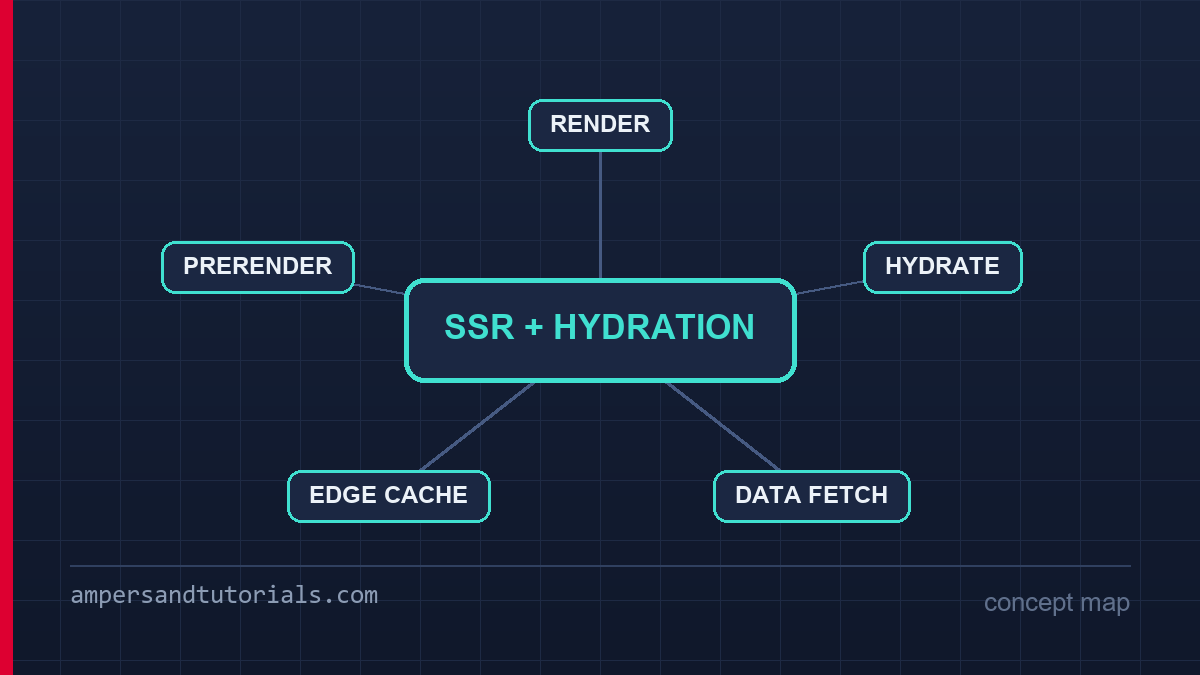
The schematic adds a server entry point, wires the server bundle into the build, and registers hydration in the app config. Two files appear: the server main that Angular Universal-style rendering calls for each request, and a route config marking which routes render on the server. Everything else — components, services, templates — is unchanged, which is the point: SSR is an execution mode, not a rewrite.
Route-level control matters in practice. Content pages usually deserve SSR, while authenticated dashboards gain little and pay for extra server work per request. The route config’s renderMode supports server rendering, client rendering and prerendering per route, so the choice can be made page by page rather than for the whole app.
Hydration: how the browser takes over
Hydration is the browser attaching Angular to the HTML the server already sent, instead of rebuilding the DOM from scratch. Angular walks the existing nodes, binds listeners and restores component state so the next change flows through the normal rendering path. Done correctly, hydration costs a fraction of the original render and avoids the visible re-build flash.
// app.config.ts
export const appConfig: ApplicationConfig = {
  providers: [
    provideClientHydration(),
    // or, with event replay for slow networks:
    // provideClientHydration(withEventReplay()),
  ],
};
The one rule that keeps hydration fast: the browser’s first render must produce the same DOM the server produced. Anything that diverges — a random default, a timestamp in the template, an *ngIf keyed on isPlatformBrowser — forces Angular to discard the server DOM and re-render, which is slower than never SSR-ing at all. Angular detects mismatches and falls back to a client re-render per component, so a single nondeterministic component silently forfeits hydration for its subtree. The event replay option adds a small cost but records clicks that happen before hydration completes and replays them afterwards, which fixes the classic slow-network problem of taps landing on dead buttons.
Writing isomorphic code: browser APIs and DI
The server has no window, document or localStorage, and code that touches them during rendering crashes the request. Angular’s platform tokens exist precisely for this boundary: inject PLATFORM_ID and branch, or better, keep browser-only code inside effects and event handlers, which never run on the server.
import { isPlatformBrowser } from '@angular/common';

constructor(@Inject(PLATFORM_ID) private platformId: Object) {}

ngOnInit() {
  if (isPlatformBrowser(this.platformId)) {
    // browser-only: analytics, scroll positions, matchMedia
    this.analytics.track('page_view');
  }
}
The dependency-injection angle is subtler and more valuable. A service registered in root exists once per server request on the server and once per app in the browser, so a service that caches user data on the server would leak state between requests if it were a true singleton. Angular’s server module resets the injector per request, but any state you stash in module scope rather than in DI escapes that reset. The rule: application state lives in injectable services, never in module-level variables. That discipline is what makes the same code safe in both environments.
Data fetching and avoiding double requests
The default SSR data flow fetches on the server, renders, then fetches the same data again in the browser after hydration. Every page pays for each request twice and the user waits for the second round. TransferState fixes it: the server serialises the response into the HTML, and the browser reads it back instead of re-fetching.
import { makeStateKey, TransferState } from '@angular/core';

const PRODUCTS_KEY = makeStateKey<Product[]>('products');

constructor(private http: HttpClient, private state: TransferState) {}

load() {
  const cached = this.state.get(PRODUCTS_KEY, null as any);
  if (cached) return of(cached);
  return this.http.get<Product[]>('/api/products').pipe(
    tap(products => this.state.set(PRODUCTS_KEY, products)),
  );
}
The same result comes from Angular’s withHttpTransferCache() provider, which applies this pattern to every HttpClient request automatically, including the interceptors already configured on the app’s HTTP stack. Cache only what is genuinely page-initial: user-specific data must never be serialised into HTML that other users or crawlers could request, which makes the auth boundary from the routing and guards guide part of the SSR design too.
SEO, crawlers and the sitemap
SSR delivers final content, but the metadata layer still has to be right. Titles and descriptions per route come from the router’s title strategy plus a meta service that writes tags on the server, so the crawler’s very first response carries them. Canonical links, Open Graph tags and structured data follow the same rule: emitted during the server render, not after hydration.
- Per-route titles. Set
titleon route definitions; Angular writes the tag during server rendering. - Meta and canonical tags. A small SEO service called from route resolvers writes description, canonical and OG tags before the response is sent.
- Robots. Ensure authenticated routes send a noindex meta tag, since SSR renders them server-side too.
- Sitemaps. Generate the sitemap from the route tree at build time, so every SSR page is discoverable.
- Status codes. Server rendering lets a missing resource return a real 404 instead of a 200 shell, which matters for crawl budget.
Deploying SSR apps: Node, Edge and prerendering
An SSR build produces a server bundle that runs wherever Node runs: a container, a serverless function, a platform adapter. The bundle listens for requests, renders, and returns HTML; static assets are served by the CDN in front. The operational difference from a static site is that you now own a process, so memory limits, cold starts and render timeouts become part of the deployment conversation.
Prerendering is the pragmatic middle path for pages that are static per URL. The build crawls the route tree, renders each page once, and emits HTML files the CDN serves like a static site, while dynamic routes still render per request. Most content-heavy applications end up mixing the three modes: prerender the marketing and article pages, SSR the search and detail pages, and leave the authenticated app client-rendered. That mix keeps server cost proportional to the pages that actually need a server, and it is the configuration most teams converge on within a month of shipping SSR.
Caching rendered pages at the edge
SSR moves rendering to the server, which means every uncached request pays render time. The layer that makes that affordable is caching in front of the renderer: a CDN holds the generated HTML per URL, serves it in milliseconds, and only falls through to a render on miss or expiry. The cache headers your app sends decide whether that layer works — a page with no explicit policy may be cached arbitrarily or not at all, and both outcomes surprise people during traffic spikes.
// per-route cache policy via router data and response headers
{
  path: 'articles/:slug',
  data: { cacheMs: 600_000 },   // 10 minutes at the edge
}

// authenticated routes must never be shared-cached
res.set({
  'Cache-Control': 'private, no-store',
});
The split that keeps both correctness and speed is stale-while-revalidate: the edge serves the last render immediately and refreshes it in the background, so users never wait while content stays at most one interval old. For pages personalised per user, the policy flips to no-store and the cost is accepted, which is exactly why the mixed-mode deployment from the last section keeps dashboards off the shared cache path.
Render errors, timeouts and graceful degradation
A server render can fail in ways a browser render cannot: the database is slow, a third-party call times out, a component throws on an edge-case route. A raw failure returns a 500 with a stack trace, which is unacceptable to both users and crawlers, so the SSR pipeline needs an error boundary at the top that falls back to the client-rendered shell with a real status code.
// server entry: catch render failures, still return the shell
try {
  const { html, state } = await renderModule(AppServerModule, {
    document: indexHtml,
    url: req.url,
  });
  res.status(200).send(html);
} catch (error) {
  logger.error('SSR render failed', error);
  // serve the client shell so the SPA still boots
  res.status(200).send(clientOnlyShell);
}
Timeouts deserve the same deliberate handling. A render that exceeds its budget should abort and fall back rather than hold a connection while the user stares at a blank response, and the budget itself should be set well below the platform’s hard limit so the fallback has room to run. Logging each fallback with its route and duration turns the metric into a health signal: a rising fallback rate is the earliest warning that a data dependency has slowed.
Choosing per route: SSR, CSR or prerender
The decision rarely deserves a single answer for the whole app. Prerendered pages cost nothing at request time and are perfect for marketing pages, documentation and article URLs whose content changes on a known schedule. Server-rendered pages suit content that varies per request — search results, personalized feeds rendered before login. Client-rendered pages remain correct for authenticated application screens where a shared cache cannot hold the output anyway.
| Route type | Mode | Why |
|---|---|---|
| Landing and article pages | Prerendered | Static per URL, cached forever, zero render cost |
| Search, listings with query params | SSR | Content varies per request, still needs first-paint speed |
| Authenticated dashboards | Client-rendered | Personal data, no shared cache, shell loads fast |
Expressing that mix in the route configuration keeps the intent reviewable: a data property per route records the mode, and a build step can verify that no public content route accidentally ships client-only. Revisiting the assignment when a page’s audience changes — a public report that gains an authenticated variant, a landing page that becomes personalized — is a one-line change with a measurable effect on crawlability, which makes it one of the cheapest SEO levers in an SSR application.
Measuring the choice closes the loop. Time to first byte, first contentful paint and the fallback rate per route class are the three numbers that tell you whether the assignment is still right, and they move when a route outgrows its mode. A prerendered page that has grown a personalized hero is the classic case: the metric dip looks like a performance regression but is really a routing decision that expired, and the fix is a one-line mode change rather than an optimization pass.
The operational side deserves the same attention as the rendering side. An SSR process holds a connection open for the length of each render, so concurrency limits, memory ceilings and restart policies decide behaviour under load far more than raw render speed does. A renderer that exhausts its memory pool fails requests it could have shed gracefully, and a deploy that replaces every instance at once creates a window where no warm renderer exists. Rolling restarts and a render timeout well below the platform limit are the two settings that turn a fragile deployment into a boring one.
New to Angular? Build the fundamentals first in the free 14-part Angular course, then come back to this guide for the deeper material.
Debugging Angular SSR: hydration warnings and server logs
The first Angular SSR failure is usually invisible in development: the server renders, the page looks right, and hydration still complains in production. Read the browser console with the official Angular SSR documentation open beside it — most hydration warnings reduce to three causes: markup the server and browser render differently, a date or random value serialized into the template, and browser-only APIs touched during the server pass.
Turn the server logs up before guessing. The renderModule call in the server entry returns errors the browser never sees: a thrown error inside a hook on the server, a missing provider in the server bundle, a null from an API the server cannot reach. A production Angular SSR deployment should log each failure with the failing route attached, and pair that log with a render timeout so a stuck route returns the client-rendered shell instead of holding the request open.
The second class of bugs is state that survived the round trip wrongly. Anything stashed in module scope on the server leaks into the next request, so state stays in injectable services and only page-initial data is serialised into the HTML. When a user sees data that is not theirs after an Angular SSR deploy, the cause is almost always a response written into TransferState that should have stayed private — the cost shows up later as a slow Core Web Vitals score too.
Third, measure the thing Angular SSR was supposed to fix. Time-to-first-byte on the server, then the gap until hydration: fast HTML means little if a heavy bundle still delays interactivity. Track both numbers. When TTFB rises after enabling Angular SSR, look at the render timeout and the edge cache first; when the hydration gap grows, look at the client bundle.
Finally, keep a fallback path visible. If the renderer throws, serve the shell with a status code that reflects reality — a 500 for a failed render, not a 200 that hides it — and let the client take over. An Angular SSR setup that degrades to client rendering on error is resilient; one that hangs on a stuck render is an outage.
A quick triage order for the whole class of problems: reproduce the page with client rendering, switch Angular SSR back on, and diff the HTML the server produced against what the browser expected. The diff usually names the bug — a stray attribute, a nested tag from invalid HTML, or a directive that behaves differently without a DOM — and the fix lands in one file.
One more habit: exercise the error path on purpose. Kill the API the server depends on in staging and watch what Angular SSR does with it. If the page returns an empty shell with a 200, the fallback logic is not wired; if it hangs until the platform times out, the render timeout is missing. Failure rehearsal finds these in minutes, production finds them at the worst possible moment.
And keep the debugging checklist short enough that people use it: console warnings first, server log second, HTML diff third. An Angular SSR problem almost always lives in one of those three places, and teams that check them in order stop guessing within an hour.
Frequently asked questions
Does Angular SSR improve SEO?
It removes the client render from the crawl path: crawlers receive final HTML with content, metadata and links intact. Combined with per-route titles and real status codes, SSR typically improves indexing of content-heavy Angular apps noticeably.
What is hydration in Angular?
Hydration is the browser attaching Angular to the server-sent DOM instead of rebuilding it. With provideClientHydration registered, Angular reuses existing nodes, binds listeners and resumes rendering, making the app interactive without a visible re-render.
Why do my data requests run twice with SSR?
The server fetches to render, and the browser fetches again after hydration. Use withHttpTransferCache or a TransferState key to serialise server responses into the HTML so the browser reuses them.
Can I use localStorage or window in an SSR app?
Not during rendering. Guard browser-only code with isPlatformBrowser, or move it into effects and event handlers which never run on the server. Accessing window during render crashes the server request.
Should every Angular app use SSR?
No. SSR pays off for public, content-heavy or SEO-dependent pages and for users on slow devices. Authenticated dashboards and internal tools usually gain little and add server cost, so a mixed setup with client-rendered private routes is often the right answer.