


Quick answer: Excel macros are small programs, called VBA scripts, that automate repetitive tasks inside a workbook. You record a sequence of steps once and Excel replays them on demand. Macros live in the Visual Basic Editor or the macro recorder, and can be assigned to a button or keyboard shortcut to run with one click.
Read this easy and quick article on what is Excel Macros, how to use macros and where it can be used.
What is VBA?
- VBA is Visual Basic for Applications
- VBA is Editor in Excel, Word and PowerPoint
- VBA is a part of the application, it cannot run independently as VB
- VBA is used in Desktop-based applications and VBS is a script language used in the web applications.
What is Macros?
- Macros is object oriented program
- Macros is part of coding that is written in VBA
- Macros is a programming language
Why Macros?
- For repeated task
- To record the change
- To create new formulae
- To simplify complicated task
The Object Model
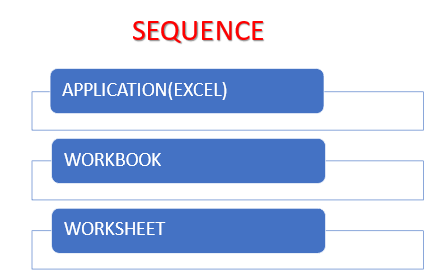
VBA is object-oriented, before you perform any actions you need to specify what object to perform on. VBA syntax is object-first then action. Objects can have relationships with other objects. This relationship is called the object hierarchy. Macros are also called a subroutine, procedure, program.

Ways to run Macros (VBA Code)
- Use shortcut key Alt + F8 get to view macro and then select your macro and run
- Go to Tab Developers / Macros
- Go to Tab View/Macros
- Use the shortcut key you assigned
- Insert any shape or image and assign the macro to it (Right mouse click and Assign Macro)
- Insert a Form Control Button from Developer Tab, Insert, Form Controls
How to Record a Macros
We can start Recording a Macro in the 4 ways mentioned below:
- Click on the record macro button at the bottom left hand side
- Use Shortcut Alt + T + M + R
- Go to Developer tab – Record Macro
- Go to View Tab – Record Macro
Now name your macros, assign a shortcut key and decide where to store them (workbook or personal macro workbook)
Run through the steps the macros needs to do
Stop the Macros.
You can also read the article about Excel Shortcut. You can also enrol in our Advance Excel Course.
Official documentation
For the full reference behind this guide, read Microsoft’s quick start for creating an Excel macro. It is the source the details above are drawn from, and the first place to check when an option or attribute name changes.
Frequently asked questions
How do I create my first macro in Excel?
u003cpu003eOpen the Developer tab, click Record Macro, name it, then perform your task and press Stop. Excel saves the steps for replay.u003c/pu003e
What is the difference between a recorded macro and a VBA macro?
u003cpu003eRecorded macros capture clicks and actions automatically, while VBA macros are hand-written code that handle complex logic.u003c/pu003e
Are Excel macros safe to run from files online?
u003cpu003eBe cautious. Macros can run code, so only enable them from sources you trust and check the VBA code first.u003c/pu003e