


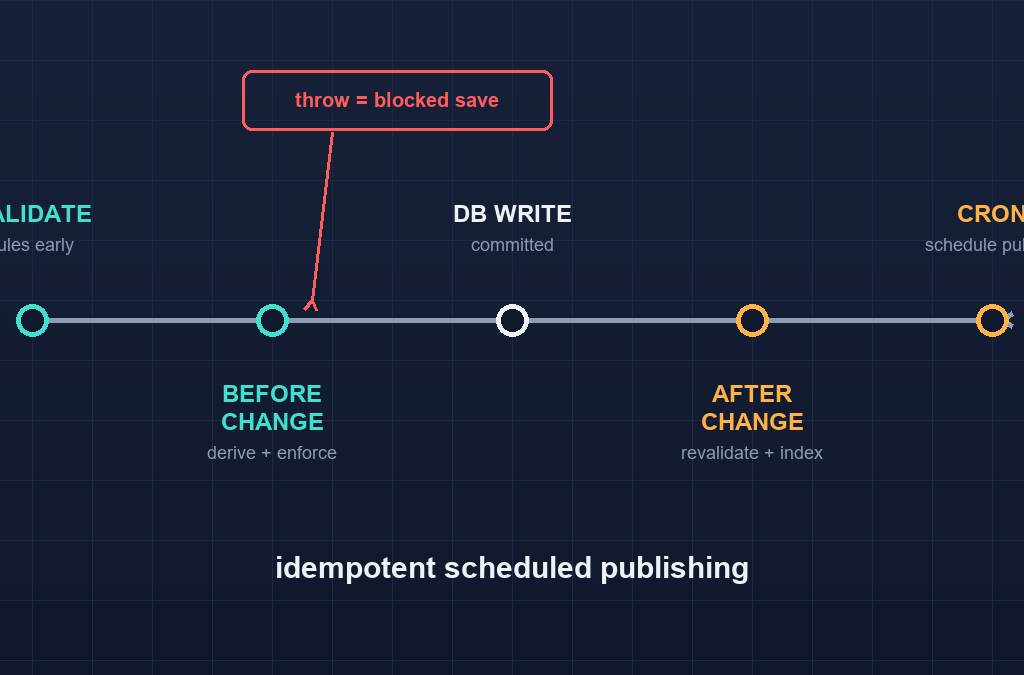
Quick answer: Payload CMS hooks and automation keep a growing content codebase consistent without manual editorial steps. Hooks are plain functions that run at fixed points in a document’s lifecycle, and they are the correct place for cross-field validation, derived values, uniqueness stamping, and syncing side effects like revalidation, email, or search indexing. This article walks through the six hooks you actually use (beforeValidate, beforeOperation, beforeChange, afterChange, afterRead, afterDelete), what to do in each, and how scheduled publishing works with a mechanism Payload does not ship built in.
Table of Contents
Part 8 of our Payload CMS series. Start with what Payload CMS is and install Payload and build your first collection, then read globals, hooks and reused collections for the picks of the right hook before you write one.
1. The six Payload CMS hooks you will actually use
Payload’s docs list more hooks than you will use weekly. These six cover nearly everything:
| Hook | Runs | Do this here |
|---|---|---|
beforeValidate | Before field validation runs | Normalize input (trim, lowercase email), reject impossible shapes early |
beforeOperation | Before the whole operation | Inject defaults based on the request, guard against concurrent edits |
beforeChange | Before each document write | Derive fields (slug, reading time), enforce cross-field rules |
afterChange | After the write commits | Revalidate pages, send notifications, sync a search index |
afterRead | On each read result | Inject computed display fields, mask data the client should not see |
afterDelete | After a delete succeeds | Clean up media, audit-log the deletion |
Two more get honorable mentions: field-level hooks (which run on a single field, scoped, and are cheaper than collection-level for simple transforms) and beforeDelete, which is where you block a delete that would orphan children.
2. beforeChange is where derivations live
Derived fields belong in beforeChange, where the data being saved is still mutable. Two patterns cover most derivations:
// collections/Posts.ts — excerpt
import { slugify } from '../lib/slugify'   // pure, unit-tested

hooks: {
  beforeChange: [
    async ({ data, originalDoc, operation }) => {
      // Pattern 1: derive once, keep stable on update
      if (operation === 'create') {
        data.slug = data.slug || slugify(data.title)
      }
      // Pattern 2: recompute only when the source changed
      if (data.content !== originalDoc?.content) {
        data.readingTime = estimateReadingTime(data.content)
      }
      return data
    },
  ],
}
The line between the two patterns matters more than it looks. A slug that silently changes every edit breaks every external link to that page; a reading time that never updates goes stale after the first edit. Decide, per derived field, whether it is written-once or kept-in-sync, and encode that decision in the hook.
3. Enforcing cross-field rules with thrown errors
Hooks that throw stop the operation. That is your enforcement tool for rules field validation cannot express, because validation runs per field while real rules are often between fields:
// A post in the review state must have editorial notes
async ({ data, originalDoc, req, operation }) => {
  if (operation !== 'update') return data
  if (data.status === 'review' && !data.editorialNotes) {
    throw new Error('Moving a post to review requires editorial notes.')
  }
  return data
}
Throwing a plain Error returns a 400-class response with your message and blocks the write. Use it for genuine impossibilities, not for formatting niceties — users should be able to save drafts while a rule still guards the final state. The access-control article showed which states admins can reach; hooks are where you also enforce transitions, not just final values.
4. afterChange: revalidate, notify, index
Side effects go after the write, and the biggest one for a Next.js site is cache revalidation. A content change has to reach the rendered site:
async ({ doc, req, operation }) => {
  if (operation !== 'update' || doc.status !== 'published') return
  // Revalidate the Next.js route for this post
  req.payload.logger.info(`revalidate /blog/${doc.slug}`)
  // then trigger your revalidation mechanism — see section 6
}
The same shape covers email (“a comment was left on your post”), search indexing (“push doc to Typesense”), webhooks (“tell Zapier”). Two rules keep these correct:
- Wrap side effects in their own try/catch and log. A failing webhook must not fail a save the database already committed.
- Decide per side effect whether it needs the
doc, thepreviousDoc, or neither. Publishing logic often needs the contrast: it is the transition fromdrafttopublishedthat matters, not the current state alone.
5. afterRead and masking data the client should not see
afterRead runs on every document that comes out of the database, on every operation that reads. That makes it a masking point and a shape-normalizer:
afterRead: [
  async ({ doc, req }) => {
    if (!req.user || req.user.role !== 'admin') {
      // Non-admin readers get a summary, not the full internal note
      doc.internalNotes = doc.internalNotes?.slice(0, 80) + '...'
    }
    return doc
  },
]
Two cautions: masking in afterRead is presentation-level, not security — an unauthorized reader who gets the full document through a code path that skips this hook is not protected. For real protection, field-level access from the auth article is the control that enforces at the query itself. Also, hooks at read time run per document; heavy computation here is multiplied over whole collection queries.
6. Scheduled publishing: Payload CMS hooks and automation beyond the editor
Here is the honest answer: Payload has no built-in cron scheduler. You can model publishDate as a date field, but nothing in Payload core wakes up at that timestamp to flip the status. The supported pattern is your own external trigger plus the Local API:
// scripts/publish-by-date.ts — run by cron / scheduled function
import { getPayload } from 'payload'
import config from '@payload-config'

const payload = await getPayload({ config })
const due = await payload.find({
  collection: 'posts',
  where: {
    status: { equals: 'draft' },
    publishDate: { less_than_equal: new Date().toISOString() },
  },
  overrideAccess: true,
  depth: 0,
})
for (const post of due.docs) {
  await payload.update({
    collection: 'posts',
    id: post.id,
    data: { status: 'published' },
    overrideAccess: true,
  })
}
Schedule that script with whatever scheduling your host provides — a cron on a VPS, a Vercel scheduled function, or a GitHub Actions schedule. The two rules that keep it safe:
- The job authorizes itself with
overrideAccess: trueand runs headless, not through a browser session. - The script is idempotent — running it twice must not double-publish. The
whereclause above guarantees that because satisfied posts stop matching.
If your editorial team needs finer control, the admin-panel route is still the primary place editors publish; the scheduler exists for posts whose timing is pre-decided.
7. Testing hooks
Extract and test the pure parts, integration-test the lifecycles:
// lib/slugify.test.ts — pure, no Payload
import { slugify } from './slugify'

test('slugify handles unicode and spaces', () => {
  expect(slugify('Héllo Wörld')).toBe('hello-world')
})
For lifecycle behavior (does status: review really block without notes?), seed an isolated Payload instance and drive operations through the Local API, then assert either the thrown error or the changed document. You are testing behavior, not Payload itself — focus assertions on your rules.
8. The mistakes you will actually make
| Mistake | Why it bites | Fix |
|---|---|---|
Side effects in beforeChange | A slow webhook makes every save slow; a throwing one blocks a commit the DB should accept | Move to afterChange, catch and log |
| Deriving on every operation instead of on change | A hook reading data.content !== originalDoc.content also fires when only status changed | Check what actually changed before recomputing |
Reading the doc you are saving from the DB in beforeChange | The DB still holds the old row; you wanted data | Use the data argument; originalDoc is the previous state |
| Triggering on every field save | Multiple hooks at different nesting levels → side effect fires twice | Register a hook exactly once per concern |
Masking secrets in afterRead | Presentation masking is not access control | Use field-level access for real protection |
| Relying on hooks for schema | A hook assumes a field exists; prod sync never ran | Migrations still manage schema — run them in deploy |
9. Key takeaways and challenge
- Six hooks cover almost every real need:
beforeValidate,beforeOperation,beforeChange,afterChange,afterRead,afterDelete. beforeChangeowns derivations and cross-field enforcement (throwing blocks the save);afterChangeowns revalidation, notification, and indexing.- Extract pure logic from hooks into testable modules; lifecycle-test with an isolated Payload instance.
afterReadcan shape and mask output, but real field protection is access control, not read hooks.- Scheduled publishing is an external job plus
payload.updatewithoverrideAccess: true— not a built-in. - Migration discipline covers the schema your hooks assume; hooks cover only the behavior.
Challenge: take the Posts collection from the earlier articles and add a beforeChange hook that refuses to publish a post whose author relationship is unset — the rule is a transition rule, so allow unpublished saves to proceed. Then write an idempotent scheduled-publish script for publishDate, and one pure helper it relies on. Finally, add an afterChange hook that logs when a post moves from draft to published but logs which state it left — that requires reading the document from the operation’s previous state, and it is worth writing down whether your first attempt passed a test before you touched it.
*Building automated publishing workflows on a real content stack? Ampersand Academy runs one-to-one mentoring on TypeScript and Next.js backends, including hook and workflow design. Built and run by Mahadhi — development and digital marketing.
Which hook should validate that one field depends on another?
beforeChange with a thrown error for transition rules that need the final values of all fields. beforeValidate runs before field validation and is best for normalizing input, not for rules that depend on validated values.
Do hooks run on every operation type?
Collection-level hooks like beforeChange and afterChange fire on create and update, and field-level variants can run per field. Read hooks fire on every read including admin queries, so read-time work is multiplied by document count.
How do I prevent a hook from double running?
Register it once. Hooks defined both on a field and its collection config at overlapping points, or imported into two places, can double-run. Keep one concern to one registration site.
Is scheduled publishing built into Payload?
No. Payload gives you the date field and Local API updates; the cron tick that flips status is your job. A scheduled function or cron script calls payload update with overrideAccess true on matched posts, and should be idempotent.
What happens if an afterChange hook throws?
The database write has already committed, so data is safe, but the operation reports failure. Catch and log inside afterChange for side effects that must not break saves.
How do I run a hook only when certain fields changed?
Compare the incoming data to originalDoc inside beforeChange and return early when the relevant field is unchanged. This is the standard guard for derived fields like a reading time.
Should heavy work run inside a hook?
Not in a blocking hook. Anything slow or failure-prone such as email, external APIs, or bulk indexing belongs in afterChange wrapped in try and catch, or better in a queued background job triggered from the hook.