


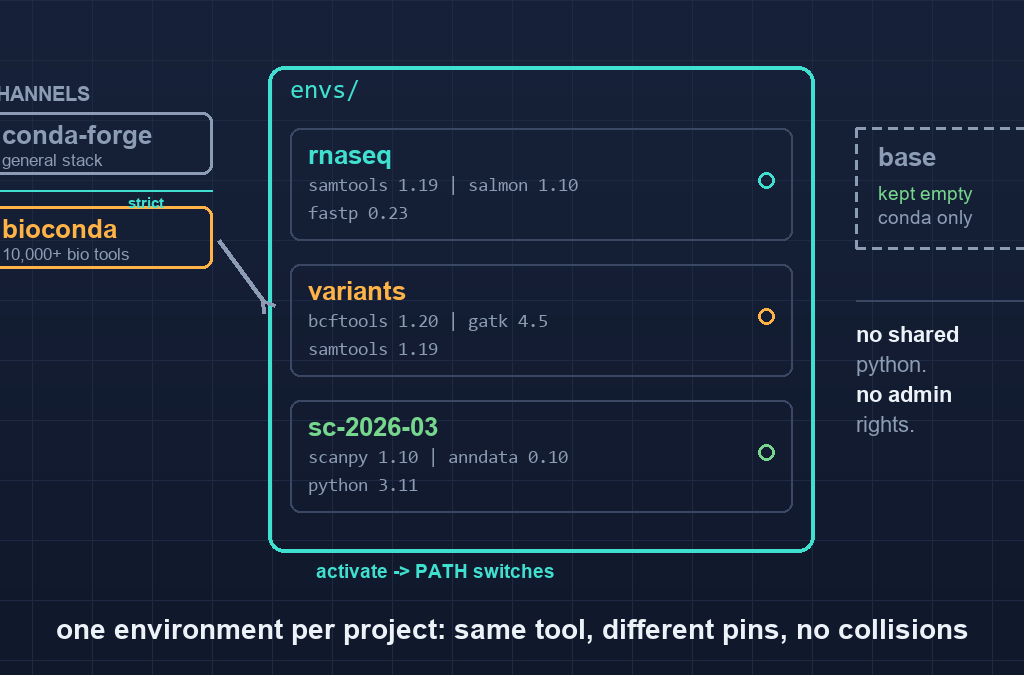
Quick answer: Conda installs bioinformatics software into isolated environments, so each project gets its own exact tool versions without touching system Python or requiring administrator rights. Install Miniforge, add bioconda with strict channel priority, then create one environment per project and pin it with environment.yml. Nearly every “conda is broken” problem comes from one of four causes: mixed channel priorities, installing into base, mixing pip and conda in one environment, or an unpinned version that silently resolves to a different build months later.
Companion to the Linux command line guide and the workflow managers article: this is the layer underneath both, the one that decides whether a pipeline runs tomorrow.
Table of Contents
What conda is actually doing
Two jobs, often confused:
- A package manager. It fetches precompiled binaries of tools (BWA, samtools, fastp, R, Python) with their C libraries and system dependencies already resolved, so a tool that normally needs a compiler and a sysadmin instead lands in your home directory.
- An environment manager. It keeps each project’s packages in a separate directory and switches your
PATHto point at the one you activate.
That second job is the reason conda matters far more than its convenience. Without environment isolation, every project shares one Python and one PATH, and installing a tool for project B silently changes what project A uses. Six months later neither pipeline is reproducible and nobody remembers which version produced the figures.
Conda vs pip: pip installs Python packages only, and compiles or expects system libraries. Bioinformatics tools are mostly not pure Python — they are C, C++, Rust, Java, or R packages with native dependencies. Use conda for those; use pip only inside a conda environment for Python packages that conda does not carry, and pin them like everything else.
Why bioconda instead of conda-forge alone
bioconda is a community channel with over 10,000 bioinformatics recipes: aligners, variant callers, quality-control tools, single-cell packages, R Bioconductor libraries. conda-forge carries the general software stack (compilers, zlib, samtools’ dependencies, Python itself). They are designed to be used together, in a fixed order of trust.
The order is not optional. If a package exists in both channels and priorities are loose, conda can satisfy one dependency from conda-forge and a sibling from bioconda, and the resulting environment contains two incompatible builds of the same library. The symptom is a crash at runtime or a solver message about conflicting packages, both of which look mysterious and neither of which is caused by the tool you installed.
Set strict priority once, in your user config:
conda config --add channels conda-forge
conda config --add channels bioconda
conda config --set channel_priority strict
Channels are searched in the order added, so bioconda must come after conda-forge to be searched last — bioconda recipes depend on conda-forge builds and expect conda-forge to win ties. Then verify:
conda config --show channels
conda config --show channel_priority
An even more robust habit, since config is per-machine and easy to drift: name the channel explicitly whenever accuracy matters (conda install -c conda-forge -c bioconda samtools) or, better, let an environment.yml state it for the whole environment.
Install Miniforge, not Anaconda
Miniforge is a small conda distribution that defaults to conda-forge and uses the fast libmamba solver. It avoids Anaconda’s licensing restrictions on institutional use and starts without hundreds of preinstalled packages you did not ask for.
# Linux x86_64; grab the current installer for your platform from the Miniforge releases page
curl -LO https://github.com/conda-forge/miniforge/releases/latest/download/Miniforge3-Linux-x86_64.sh
bash Miniforge3-Linux-x86_64.sh
Accept the default install location (~/miniforge3) — a path with no spaces and no special characters, for a reason covered below. Let the installer run conda init, then restart your shell.
Confirm you are not running as root, and that base is active only for managing environments:
conda --version
conda info | head
Do not install analysis tools into base. base exists to hold conda itself. Tools installed there are available in every environment, which defeats isolation, and upgrading one of them can break conda mid-upgrade. If base already has a pile of tools, conda list -n base will show it; the honest fix is a fresh Miniforge install, not an attempted cleanup.
One environment per project
conda create -n rnaseq -c conda-forge -c bioconda fastqc fastp salmon samtools subread
conda activate rnaseq
Naming conventions that save future confusion: name by purpose, not by tool (rnaseq, variants, sc-2026-03), because the tool list changes and the purpose does not. Avoid spaces, uppercase, and : in names.
Then work from inside the environment, and check what you actually have:
which fastqc samtools
fastqc --version
samtools --version | head -2
conda list | wc -l
which is the fastest diagnostic in the whole workflow: if it prints a path outside ~/miniforge3/envs/<name>/, the tool is coming from somewhere else — a system install, a stale PATH entry, or an environment that never activated.
Deactivate when switching projects; activate the next one rather than layering:
conda deactivate
conda activate variants
Layering environments (conda activate while another is active) leaves the previous PATH entries in place, which is exactly how two samtools binaries end up fighting.
Pinning: the part that makes results reproducible
An environment that works today is not the same as an environment that works next year. Capture the exact state in the project directory:
conda env export --from-history > environment.yml   # only what you asked for
conda env export > environment-lock.yml             # every package and build string
--from-history records the tools and versions you explicitly requested plus the channels — readable, portable, and the file to commit. The full export records dozens of transitive packages down to build hashes — exhaustive and machine-specific (it embeds your platform and absolute paths in some cases), so treat it as a lockfile for one machine rather than a sharing artifact.
Version pinning syntax worth knowing:
name: rnaseq
channels:
  - conda-forge
  - bioconda
dependencies:
  - samtools=1.19          # exact enough for most work
  - bwa=0.7.17
  - python=3.11
  - pip
  - pip:
      - some-pypi-only-package==1.2.3
Rebuild anywhere with conda env create -f environment.yml. Rebuild from an older file and you get the versions the analysis used, provided those builds are still on the channel — which is precisely the limitation containers solve, and why the workflow managers article treats conda as the minimum and containers as the honest standard for publication-grade work.
The four failure modes, and their fixes
1. “Packages are incompatible” / the solver takes ten minutes. Almost always mixed channels or loose priority. Confirm channel_priority: strict, make sure bioconda is listed after conda-forge, and create a fresh environment rather than conda installing on top of an already-mixed one. Adding -c conda-forge -c bioconda explicitly to the create command prevents the usual drift.
2. The tool installs but crashes immediately. Typically a pip install inside a conda environment overwrote a library conda had installed, or the reverse. Fix: install everything conda can supply with conda, install pip packages last, and if pip must replace a conda package, remove it from conda first. If a tool segfaults with no message, check conda list --revisions and roll back (conda install --revision N) to test whether a recent upgrade caused it.
3. command not found after a successful install. The environment is not active, or it was activated in a different shell. Check conda info --envs, then conda activate <name>; confirm with echo $CONDA_DEFAULT_ENV. In batch scripts and cron, activation does not happen automatically — call source ~/miniforge3/etc/profile.d/conda.sh && conda activate <name> at the top of the script, or use the environment’s binary by absolute path.
4. Everything breaks after a base upgrade. base was used as the working environment. Reinstall Miniforge and keep base empty; per-project environments are the whole design.
Two more that cost an afternoon each: paths with spaces (Java tools such as GATK and some R packages mishandle them — never install or run from /home/My Data/), and old glibc on the cluster (a current bioconda build may refuse to run on an older shared system; install with CONDA_OVERRIDE_GLIBC, or use a container, which is the cleaner answer).
Speed and scale
The libmamba solver is the default in current Miniforge and is several times faster than the classic solver. If resolution is still slow, install mamba into base and use mamba create/mamba install; on HPC systems where even that is too heavy, micromamba is a single static binary with no base environment at all.
Two habits worth adopting on a shared cluster:
- Put environments on scratch, not home. A
~/.condadirectory with fifty environments exhausts a home quota quickly and slows login nodes. Setpkgs_dirsandenvs_dirsin.condarcto a shared filesystem path with space. - Do not run heavy installs on the login node. Resolution and download are network- and CPU-heavy; most clusters provide a build or transfer node for exactly this, and admins notice when a login node is pegged.
What to hand over with the analysis
A defensible methods section names tool versions. Conda makes that trivial and therefore inexcusable to omit:
conda list --export > tool-versions.txt # one line per package, paste-readyShip that file with the scripts. It is the difference between “we used samtools” and “we used samtools 1.19 with the environment archived alongside the code”, and it takes one command.
Key takeaways
- Conda’s real value is environment isolation, not installation convenience — separate environments are what keep two projects from silently sharing a dependency.
- Install Miniforge (conda-forge default,
libmambasolver), keepbaseempty, and put each project in its own purpose-named environment. - Set
channel_priority: strictwithbiocondaafterconda-forge; mixed channels are the top cause of solver conflicts and runtime crashes. - Commit
environment.ymlfrom--from-historyfor sharing and a full export as a lockfile for one machine, and archiveconda list --exportwith every analysis. - The four classic failure modes — mixed channels, pip/conda mixing, unactivated environments in scripts, and tools installed into
base— have simple, permanent fixes. - Conda records versions; containers also record the operating system. For anything that must reproduce years later, conda is the minimum, not the ceiling.
Challenge
Build the same analysis environment twice: once with a single conda create command naming the tools, and once from a hand-written environment.yml that pins each version. Then run conda list --export on both and diff the output. The differences show you exactly which packages were pulled in transitively and how much your “same setup” depended on the day you installed it. Finally, activate the environment from a fresh shell using only the source .../conda.sh && conda activate line — no interactive conda init — because that is the form every script and scheduler job must use.
Want guided practice building reproducible analysis environments? Ampersand Academy offers one-to-one mentoring in bioinformatics — part of Mahadhi, a development and digital marketing company.
FAQ
Conda or mamba — does it matter?
For installing and creating environments, mamba is a drop-in replacement that resolves dependencies faster; current Miniforge already uses the libmamba solver, so plain conda is fast enough for most work. micromamba is the better choice on HPC systems where a base environment is undesirable.
Should I use Anaconda or Miniforge?
Miniforge. It defaults to conda-forge, starts nearly empty, and avoids Anaconda’s licensing restrictions on institutional and commercial use. Anaconda’s large preinstalled package set is a liability, not a feature, for reproducible bioinformatics.
Why does conda keep telling me packages are incompatible?
Almost always mixed channel priorities. Bioconda recipes expect conda-forge builds of their dependencies; with loose priority, conda can mix incompatible builds. Set channel_priority to strict, list bioconda after conda-forge, and create a fresh environment instead of installing over a broken one.
Can I use pip inside a conda environment?
Yes, for Python packages conda does not carry, but install them last and pin the versions. Never let pip overwrite a library conda installed, because conda does not know about the change and later environment operations will undo or corrupt it.
How do I make my environment reproducible for a paper?
Commit an environment.yml generated with –from-history, archive the full export and conda list –export output with the analysis, and for long-term reproducibility build a container from that environment. Conda pins package versions; containers also pin the operating system and system libraries.
Where should I install conda on a cluster?
In your home directory or, better, on a shared scratch filesystem configured through envs_dirs and pkgs_dirs in .condarc. Home quotas are usually small, and dozens of environments fill them quickly; never install or resolve dependencies on a login node.
Do I need a container if I already use conda?
Not for everyday analysis, but yes for anything that must run identically years later or on a different institution’s cluster. Conda covers tool versions; containers cover the system libraries underneath them, which is where most cross-machine breakage actually happens.